"тнιѕ вℓσg ¢συℓ∂ ѕανє уσυя мσηєу ιƒ тιмє = мσηєу" - ∂.мαηנαℓу

Monday, 12 September 2011

Developer Toolkit (Beta) for CRM 2011-- A Catalyst for Dynamics CRM 2011 Development

The latest beta version of Developer toolkit(Integrated with VS 2010 IDE) for Dynamics CRM 2011 is included in the SDK. In the SDK, you could find it in the tools folder. I could see it as a catalyst for Dynamics CRM development. It saves a lot of time. Also its well structured.  Lets have a quick look at the beta version of Developer Toolkit for CRM 2011. You could find the following files in the developertoolkit folder. Installation of Developer toolkit is very easy.


You could see the following installation wizard and its super quick installation.


After installation, if you try to create a new project, you could see a section called Dynamic CRM as shown below. The ideal option would be to opt a solution. Because it would contain all the necessary elements for a Dynamic CRM 2011 project development. But choice is yours.


Next step is a connection wizard to connect to Dynamics CRM Server as shown below.


It would assume that we might need a silverlight project and displays various options for silverlight project. Again its optional.


It provides a very cool CRM Explorer. So "Dynamics CRM is visible from VS"


Lets have a look at the solution. As mentioned earlier it provides the necessary components for Dynamics CRM Development. Lets try to add a web resource.


Next step is to choose the web resource file type.


Please note the properties window of the web resource file.


In order to deploy something, you could choose the following option found on CRMPackage.


Do you think its a catalyst for Dynamics CRM 2011 Development?

Friday, 2 September 2011

Connections in CRM 2011

In simple words, 'Connections in CRM 2011' is a feature by which you could define relation between two entities ( including custom entities).
For Instance, an account namely AP could connect to a contact Mr.George as an employee(connection role).

In a connection, One record is related to another record based on a connection role.

A Connection always provides 2 options for us.

1. To Another (To another enitity record)
2. To Me (To the logged in User)

How could we establish connection from Main Page:


But the Connection button gets disabled if more than one records were selected.


How could we establish connection from Entity form:


Its possible to view all exisiting connections of a particular record by clicking on the 'Connections' left navigation item.

The key players of 'Connections' feature are 2 entities.

1. Connection Entity ( Can be customized)-Relationship between two entities.
2. Connection Role Entity( Can NOT be customized) -Role describing a relationship between a two records.


Connection Role is the key element of a Connection which makes it meaningful.

How could we configure a Connection Role in CRM 2011:


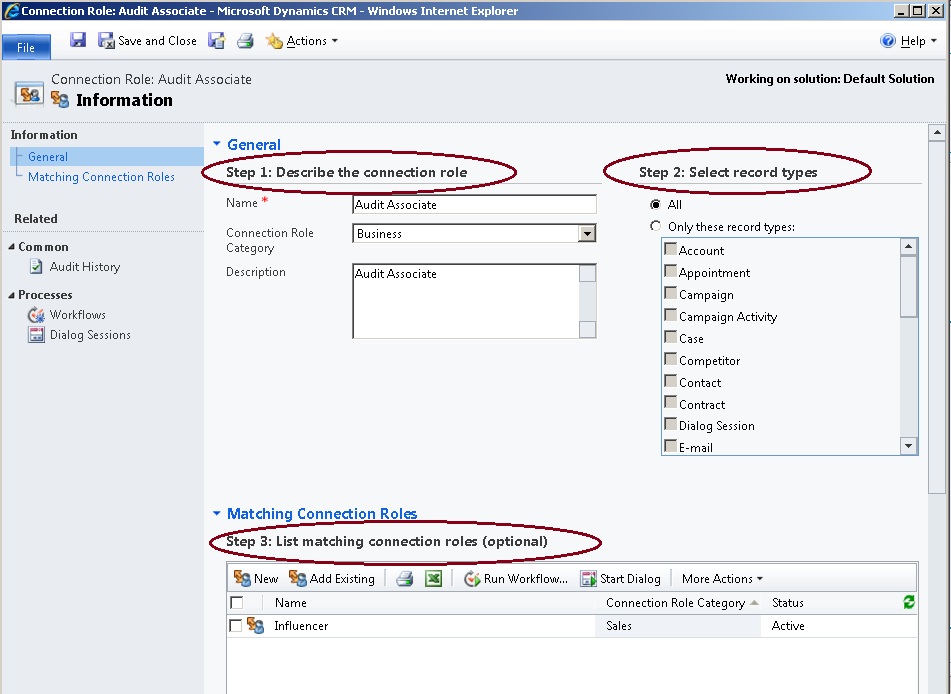
Configuring a Connection Role in CRM 2011 involves 3 steps.


1. Describe Connection Role-- This includes defining  new name for the connection role and choosing  a connection role category.

2. Select record types

3.Choose mathing Role (Optional)-- This is a kind of intellisense
For instance, If you choose Role (To) in a Connection then CRM will automatically populate the Connection Role (From) if a matching role already defined.

So lets create a Connection based on the configured Connection role.

Here we go !


How to enable Connections at Entity Level in CRM 2011:

When you create an entity, you could decide enable/ disable Connections with the following setting.


Wednesday, 31 August 2011

Sunday, 17 July 2011

How to refer a webresource file from Javascript in CRM 2011

As we all know,  webresources utility is one of the very good features of CRM 2011.
Let's see how to refer a webresource from Javascript file in CRM 2011.

Its very simple syntax. For Instance,
Imagine that you have uploaded a webresource called new_ConfigureAttributes.xml
If you want to refer it in Javascript at some point, you could use the following syntax

var xmlPath = "../WebResources/new_ConfigureAttributes.xml";

For a detailed sample, you could have look at the following post.

Related Post :Reading an XML file in CRM 2011 using javascript http://crmdm.blogspot.com/2011/02/reading-xml-file-in-ms-dynamics-crm.html

The key advantage is that its not dependent on any folder structure and also its easy to refer it. You have a file ( could be any web resource file eg:xml, jpg,css,png etc) and you need to upload it to webresources first and then refer it from Javascript whenever required. Even if you move solution from one environment to another it would work perfectly. The reason is simple, its a direct reference to Webresources which is a part of solution. If you want to refer a webresource from Sitemap or Customizations.xml , you could refer the following post.

How to refer a webresource file from Sitemap or Customizations.xml
http://crmdm.blogspot.com/2011/02/how-to-refer-webresource-file-from.html

Thursday, 7 July 2011

How to call a Dialog in CRM 2011 using Javascript

Let's see how to call a Dialog using Javascript in CRM 2011.
Firstly we need to find out the ID of the Dialog. This could be attained in 2 ways.

1. Search with Dialog name in Customizations.xml

For eg: If you search with your dialog name, you could find something similar to this.

<Workflow WorkflowId="{a13ad982-d812-40a0-ab67-f314cdabbd2b}" Name="MyDialog">
</Workflow>


2. Open the Dialog and press F11 to get the URL. In the URL we could find out the ID of the Dialog.


Javascript Code snippet:
var dialogId = "a13ad982-d812-40a0-ab67-f314cdabbd2b"; // This must be your Dialog ID
var returnValue = showModalDialog("/" + Xrm.Page.context.getOrgUniqueName() + "/cs/dialog/rundialog.aspx?DialogId=%7b" + dialogId + "%7d&EntityName=account&ObjectId=" + Xrm.Page.data.entity.getId());

//Optional:To save and close entity form as soon as the dialog is closed.
Xrm.Page.data.entity.save("saveandclose");


Sample Scenario  :
To open a Dialog when the user clicks on Ribbon button of the entity form.


Thursday, 30 June 2011

How to save an entity record in CRM 2011 using javascript

In CRM 2011, you could save an entity record using javascript.

There are 3 types of save possible using javascript in CRM 2011.

1. Equivalent to 'SAVE' button found on the entity form

Xrm.Page.data.entity.save();
2. Equivalent to 'SAVE AND NEW' button found on the entity form

Xrm.Page.data.entity.save('saveandnew');

3. Equivalent to 'SAVE AND CLOSE'  button found on the entity form

Xrm.Page.data.entity.save('saveandclose');

Saturday, 25 June 2011

How to clear Lookup in CRM 2011/ Lookup filtering and clearing lookup in CRM 2011 / How to pass argument to js function in CRM 2011

As you all know, one of the best features of CRM 2011 is lookup filtering just because it reduces coding. Consider that we are filtering second lookup based on first one. We need to clear the second lookup whenever the user change the selection of first lookup.Lookup feature Reference: http://crmdm.blogspot.com/2011/04/lookup-fitering-feature-in-crm-2011-or.html

Scenario:
2 lookups Country and City

When the user selects UK from first lookup then second lookup lists cities belongs to UK( based on lookup filtering feature)
Now the user would like to update Country to Denmark. so when the user selects country as Denmark then the city lookup should be cleared. And then the user gets a chance to choose cities belongs to Denmark.

This could be achieved by simple javascript by passing an attribute.


Code Snippet:

function SetLookupNull(lookupAttribute)
{
var lookupObject = Xrm.Page.getAttribute(lookupAttribute);


if (lookupObject != null)
 {

Xrm.Page.getAttribute(lookupAttribute).setValue(

null);

}

}

The function call is on the onchange event of first lookup


Please note that we need to pass the attribute name of the lookup which should be cleared.


The key advantage of the above function is reusability. You could clear any lookup value as per the need by supplying the attribute name as shown.